DSP vs Mach3 vs NcStudio is often argued as a software comparison. The more useful comparison is architectural: where the motion trajectory runs, what the operator touches during the shift, and what has to be maintained for the machine to keep cutting. Those three questions predict the day-to-day experience more reliably than a feature table.
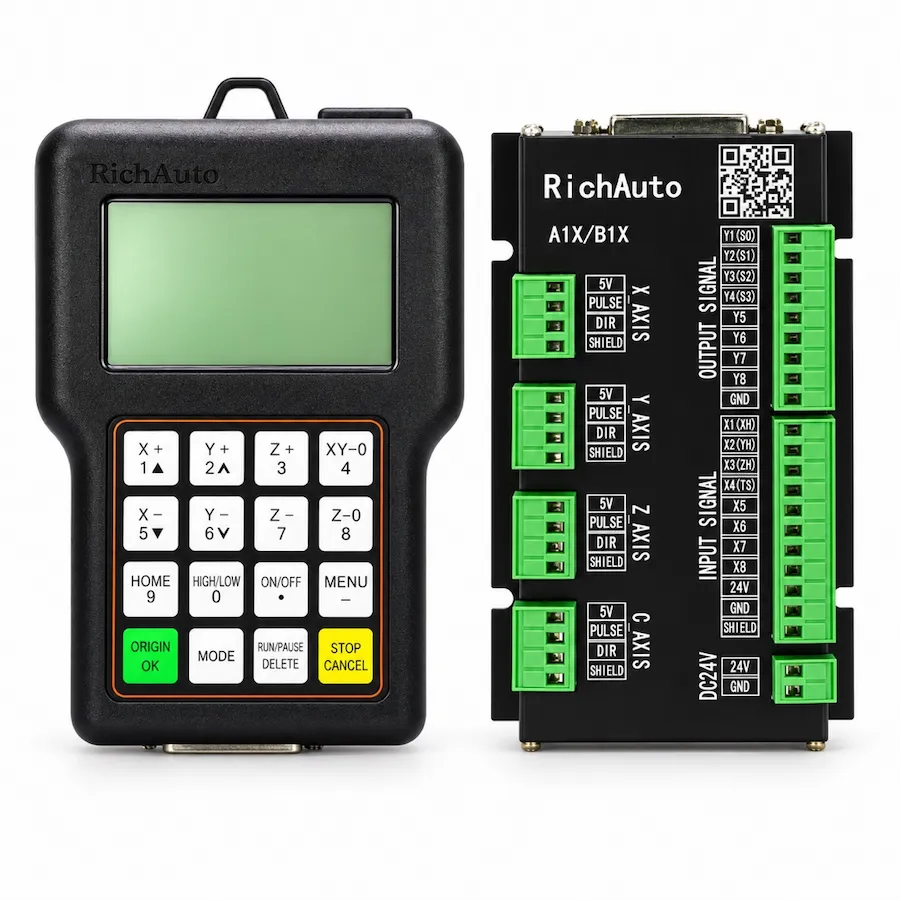
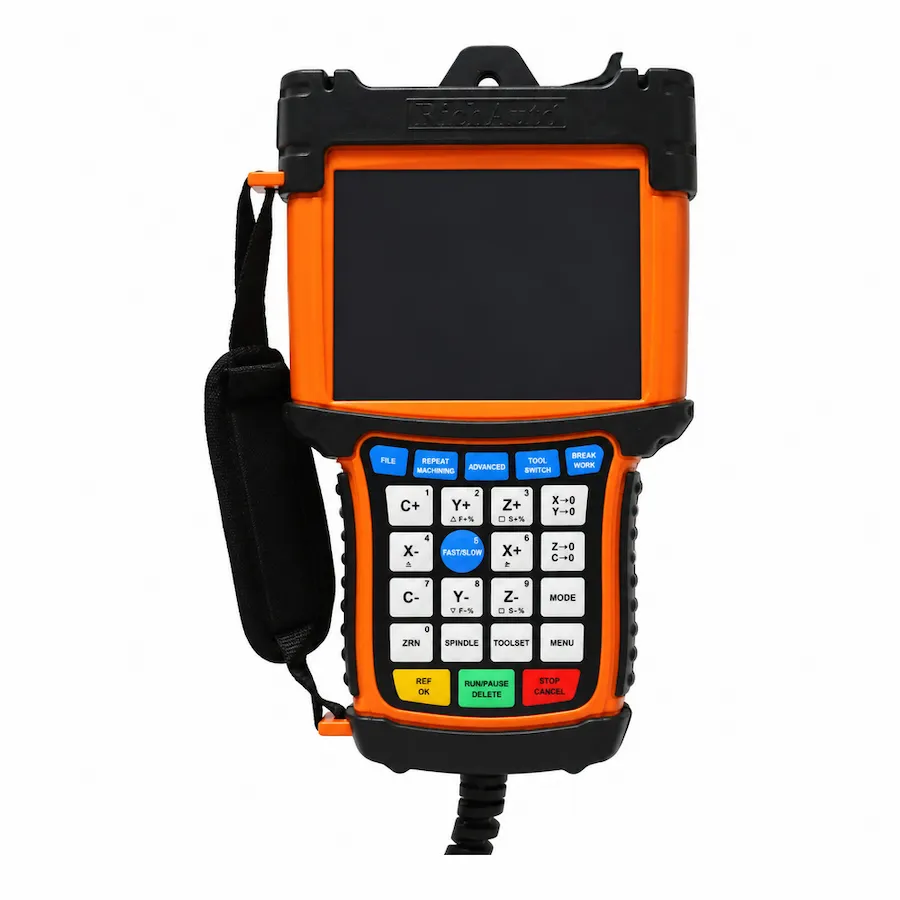
This guide compares the three arrangements as they appear on real machines: an offline DSP controller such as the RichAuto A1X and B5X ranges, Mach3 running on a Windows PC, and NcStudio paired with a dedicated motion card. It does not rank them. Each arrangement fits a different operating context.
Where the Trajectory Runs
Scroll horizontally to read all columns.
| Aspect | Offline DSP controller | Mach3 on a PC | NcStudio with a motion card |
|---|---|---|---|
| Where the file runs | On the controller | On the PC | On the PC, with motion produced by the card |
| Operator interface | Handheld unit and display | Monitor, keyboard, mouse | Monitor and keyboard |
| PC required during machining | No | Yes | Yes |
| Motion signal source | Controller outputs | PC interface or external controller | Dedicated motion card |
| Typical maintenance | Controller and wiring | PC, operating system, software, interface | PC, software, card and wiring |
| Recovery after a stop | Restart on the controller | Restart software and re-reference | Restart software and card |
The distinction that matters on a shop floor is the second row. An offline controller takes the computer out of the machining path. A PC-based system keeps the computer in that path, which is acceptable when the computer is treated as production equipment rather than as an office machine.
Offline DSP Control
An offline controller reads the machining file from local media, runs the trajectory on its own hardware and presents the operator with a handheld interface. File preparation still happens on a computer, but the computer is not connected while the machine cuts.
The strengths are straightforward. There is no operating system to update, no software licence to manage and no PC hardware to replace when a fan fails. The operator interface is designed for the machine, so the common actions — jog, set work zero, change a feed override, restart after a breakpoint — are reachable without a mouse.
The limits are equally real. File transfer uses removable media or a network option rather than a shared folder. The display is smaller than a monitor. Some advanced programming workflows are easier on a PC, and the controller’s own parameters need a written record because the interface is not a full desktop environment.
For a router or a machine where the operator stands at the machine all day, that trade is usually favourable. The A11 three-axis controller and the B57 ATC controller show how the range covers conventional routing and tool-changing work.
Mach3 on a PC
Mach3 turns a Windows computer into a machine controller. The PC generates the motion commands and passes them to the machine through a parallel port, a breakout board or an external motion controller, depending on the hardware.
Its strength is flexibility. The interface is a full screen, the configuration is exposed, and a knowledgeable user can adapt it to unusual hardware. A workshop with a spare PC and an operator who understands the software can keep an older machine running with modest cost.
Its weakness is the same flexibility. The machining path depends on the operating system, the software version, the PC’s timing behaviour and the interface hardware. Windows updates, background processes, a failing power supply or a mouse driver can all interrupt a job. That does not make the arrangement unsuitable; it makes maintenance part of the operating cost.
Mach3 also assumes an operator who is comfortable with software configuration. Where that person leaves, the machine’s knowledge leaves with them unless the configuration is documented.
NcStudio with a Motion Card
NcStudio follows a different model: the PC runs the user interface, while a dedicated motion card generates the signals. The card provides the deterministic part that a general-purpose operating system cannot guarantee, and it defines the machine interface.
That arrangement suits production environments where a PC-based workflow is wanted but the timing must be predictable. It is common on machines built around a specific card, with the wiring and the manufacturer’s configuration aligned to it.
The trade is dependency on that card and its software. A replacement card has to match the machine wiring and the software version, and the configuration is not portable in the way a set of controller parameters is. Where the card is well supported locally, the arrangement is durable; where it is not, a fault can take the machine out of service for longer than the fault itself deserves.
A Decision Table for Real Installations
Scroll horizontally to read all columns.
| Your situation | Arrangement to investigate | Question to settle first |
|---|---|---|
| Operator works at the machine, simple file workflow | Offline DSP controller | Does the file transfer path suit the job? |
| Existing machine already runs Mach3 with a known configuration | Keep and document it | Who maintains the PC and software? |
| Production cell built around a motion card | NcStudio with that card | Is a spare card and software version available? |
| Dusty or hot environment with an office PC nearby | Offline controller | Where will files be prepared? |
| Frequent program changes from a design office | PC-based arrangement | How are versions controlled? |
| Machine must keep running without a PC | Offline controller | How is the file delivered to the machine? |
The environment question is often decisive. A PC in a dusty cabinet needs filtered air and a maintenance routine; an offline controller in the same cabinet needs neither, but it does need a practical way to move files.
Operator Skill and Shift Handover
The three arrangements ask different things of the person at the machine. An offline controller presents a machine interface: the operator jogs, sets the origin, loads a file and runs it. A PC-based arrangement adds a desktop environment, which brings file management, software dialogs and the possibility of an operating-system message arriving mid-job.
That difference shows up at shift handover. With a handheld interface, the state of the machine is visible on the unit: position, program, feed override and any active alarm. With a PC, the state also includes which window is open, whether the software is in the right mode and whether the file was saved. A documented handover routine covers both, but the routine is longer for the PC arrangement.
None of this argues against a PC-based system. It argues for training that matches the arrangement, and for a written routine that a new operator can follow on the first day rather than the third week.
Migration Is a Retrofit, Not a Swap
Moving a machine between these arrangements changes more than the controller. The wiring interface, the drive signals, the parameters, the operator workflow and the post processor all move with it. A machine that ran Mach3 will not accept a DSP controller merely because the connectors fit.
Plan the change as a control retrofit: inventory the existing interface, confirm the drive signals, decide how files will be delivered, define the parameters and retrain the operator. The retrofit guide sets out that scope, and the buying guide covers how to narrow the model once the architecture is settled.
Where the machine is already running and the question is a fault rather than a change, start from the controller not working guide instead. A control architecture decision made during a breakdown is usually a decision that gets revised later.
If the offline term itself needs a definition first, read what a DSP controller is.
If the offline term itself needs a definition first, read what a DSP controller is.